Business
NPlot: The Complete Guide to the .NET Charting Library

1. What Is NPlot?
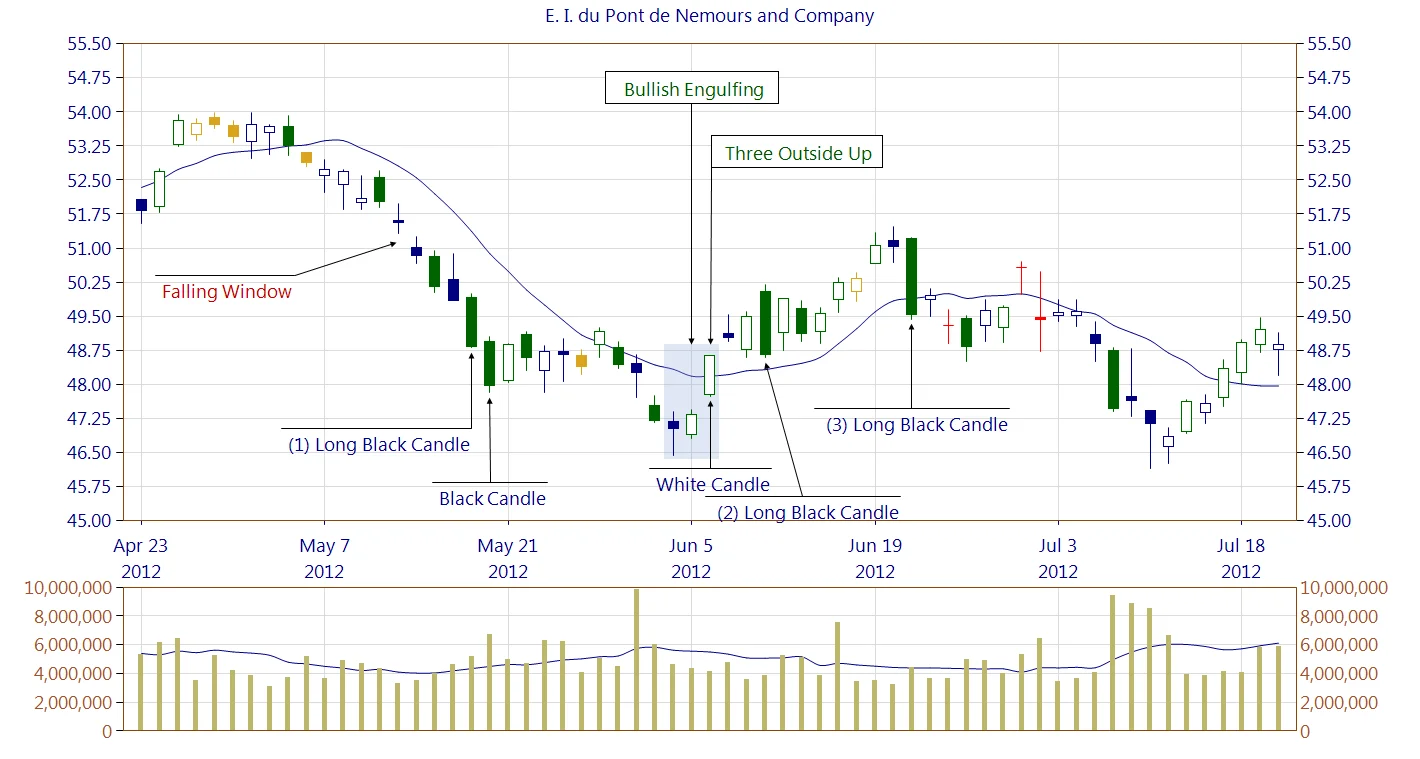
NPlot is a free, open-source plotting and charting library written in C# for the .NET framework. It allows developers to generate 2D charts, graphs, and visual data representations within Windows Forms and ASP.NET applications.
Originally developed by Colin Green, NPlot was designed to be a lightweight alternative to commercial charting tools like Microsoft Chart Controls or Telerik Charts. It offers ease of integration, extensibility, and full source access, making it an excellent choice for students, researchers, and developers working on scientific or financial visualization projects.
2. Key Features of NPlot
NPlot offers a surprisingly rich feature set for such a compact library:
- Multiple Chart Types: Supports line graphs, scatter plots, bar charts, step lines, markers, histograms, and pie charts.
- Customizable Axes: Easily modify linear, logarithmic, or date-time axes for accurate scaling and readability.
- Interactive Elements: Provides zooming, panning, and data highlighting features for user interactivity.
- Cross-Platform Support: Works across Windows Forms, Mono, and GTK#, making it adaptable for Linux and cross-platform .NET apps.
- Export Options: Charts can be saved as PNG, JPEG, SVG, or PostScript images for easy sharing or report embedding.
- Lightweight Codebase: At only a few hundred kilobytes, NPlot keeps your project fast and efficient.
Developers often praise its balance between simplicity and control, allowing them to produce professional-looking visuals without a steep learning curve.
3. How to Install and Set Up NPlot
Setting up NPlot in your project is straightforward.
Step 1: Download the Library
You can obtain the source or pre-compiled binaries from GitHub or older SourceForge repositories.
Example:
Step 2: Add Reference
In Visual Studio, right-click your project → Add Reference → Browse → select NPlot.dll.
Step 3: Add a Plot Surface
Create a chart using Windows Forms:
Step 4: Populate Data
Once compiled, you’ll see a clean, interactive chart displayed in your app window.
4. Advantages of Using NPlot
The main advantage of NPlot is its open-source flexibility combined with a small footprint. Developers benefit from:
- Free Licensing: Completely open under permissive terms—ideal for academic or commercial use.
- Full Customization: Modify drawing logic or extend plot types without dependency on proprietary APIs.
- Performance Efficiency: Handles thousands of data points smoothly on typical hardware.
- Integration Ease: Works seamlessly with WinForms, WPF (via interop), and web apps built on ASP.NET.
- Active Community Forks: Even though the core library is mature, community developers have maintained updated forks that integrate with .NET 6+ and CoreCLR.
Because it’s transparent and extendable, many engineers use NPlot as a base engine for larger visualization platforms or internal dashboards.
5. NPlot Alternatives and Competitors
While NPlot is a capable tool, comparing it with competitors helps clarify when it’s the best fit:
| Library | Language | License | Strengths |
|---|---|---|---|
| OxyPlot | C# (.NET) | MIT | Modern, supports WPF, Xamarin, and MAUI |
| ScottPlot | C# (.NET) | MIT | Fast rendering, active development |
| ZedGraph | C# (.NET) | LGPL | Older but highly customizable |
| Matplotlib | Python | BSD | Excellent for scientific use (non-.NET) |
Choose NPlot when you need simple, embedded charts in desktop applications without additional dependencies. For mobile or cross-device visualization, newer frameworks like OxyPlot might be better.
6. The Future of NPlot and Final Thoughts
Although NPlot is a mature library, it remains relevant due to its stability, compactness, and open nature. Developers have successfully ported it to .NET Core and .NET 8, ensuring it stays compatible with modern environments.
The library continues to inspire educational projects, scientific simulations, and business dashboards where performance and simplicity matter. Its architecture—rooted in classic object-oriented design—makes it an excellent resource for learning data visualization principles in C#.
In summary, NPlot stands as a reliable, time-tested library that empowers developers to visualize complex data effortlessly, maintaining a perfect balance between functionality and minimalism.

For more than 40 years, Eron Johnson Antiques has been one of the most respected names in the American antiques industry. Known for its extraordinary collection of museum-quality furniture, architectural salvage, fine art, lighting, and decorative objects, the Denver-based gallery attracts collectors, interior designers, architects, homeowners, and antique enthusiasts from around the world.
Unlike a traditional antique mall, Eron Johnson Antiques specializes in carefully curated pieces spanning over 400 years of design history, from the 17th century through the mid-20th century. Whether you’re restoring a historic property, decorating a luxury residence, or searching for a one-of-a-kind statement piece, this iconic showroom offers one of the largest and most diverse antique collections in Colorado.
This comprehensive 2026 guide explores the company’s history, inventory, shopping experience, online buying options, and why it continues to rank among Denver’s premier antique destinations.
The History of Eron Johnson Antiques: More Than 40 Years of Excellence
The story of Eron Johnson Antiques began long before the business became internationally recognized. Founder Eron Johnson entered the antiques trade at just 19 years old, traveling across the United States in an old van searching for rare and historic treasures to sell to antique dealers.
By the age of 22, Johnson had opened his first gallery, laying the foundation for what would become one of Colorado’s most respected antique businesses.
As demand grew, the company expanded significantly:
- 1995: Opened a 20,000-square-foot showroom
- 2008: Added a 30,000-square-foot warehouse dedicated primarily to architectural salvage
- Today, the business operates from a beautifully restored 1920s industrial building in Denver’s Valverde neighborhood.
During the 2010s, the company embraced the brand philosophy “Centuries of Design.” Rather than focusing solely on traditional antiques from the 17th through 19th centuries, Eron Johnson expanded the collection to include:
- Mid-century modern furniture
- Contemporary artwork
- Designer lighting
- Decorative arts
- Historic architectural elements
- Antiquities from multiple cultures
This evolution allows visitors to experience several centuries of craftsmanship under one roof while preserving the gallery’s reputation for authenticity and quality.
Explore Over 8,000 Antiques Covering More Than 400 Years of Design
One of the biggest reasons collectors visit Eron Johnson Antiques is the incredible size and diversity of its inventory.
The company houses over 8,000 antiques, with 3,000+ pieces displayed inside the showroom and 5,000+ items available through its online catalog, which is updated daily.
Antique Furniture
Furniture collectors can browse exceptional examples of:
- English antiques
- French antiques
- Continental European furniture
- American period furniture
- Baroque furniture
- Georgian pieces
- Victorian furniture
- Renaissance-inspired designs
- Mid-century modern classics
Many pieces date from the 1600s through the 1900s, making the gallery a valuable resource for authentic period interiors.
Architectural Salvage
Architectural salvage remains one of the company’s signature specialties.
Available inventory regularly includes:
- Antique doors
- Stained glass windows
- Marble fireplace surrounds
- Limestone fireplaces
- Iron gates
- Columns
- Garden ornaments
- Antique mantels
- Architectural carvings
- Historic ironwork
Rare finds may include 18th-century French doors, 17th-century Indo-Portuguese Baroque carvings, reclaimed building materials, and decorative architectural fragments sourced from around the world.
Lighting and Decorative Arts
Collectors also discover an impressive selection of:
- Antique chandeliers
- Wall sconces
- Art glass lamp shades
- Interior lighting
- Exterior lighting
- Decorative mirrors
- Bronze sculptures
- Antique clocks
- Ceramics
- Porcelain
- Decorative accessories
Fine Art Collection
The gallery regularly features:
- European paintings
- American artwork
- Asian art
- Antique prints
- Sculptures
- Decorative objects
- Historic collectibles
Each department reflects the company’s emphasis on quality, authenticity, and historical significance.
Why Interior Designers, Architects, and Collectors Choose Eron Johnson Antiques
One factor separating Eron Johnson Antiques from many antique stores is its close relationship with the professional design community.
The gallery serves:
- Interior designers
- Architects
- Contractors
- Luxury homeowners
- Property developers
- Museums
- Antique collectors
- Retail customers
Professional clients appreciate the company’s:
- Trade pricing
- Worldwide shipping
- Project sourcing
- Custom recommendations
- Architectural salvage expertise
- Estate sale assistance
- Prop rentals
- Event rentals
Design professionals frequently source statement pieces for luxury homes, boutique hotels, commercial projects, restaurants, and historic renovations.
Service extends well beyond Denver, including:
- Cherry Hills Village
- Greenwood Village
- Englewood
- Bow Mar
- Glendale
- Southglenn
- Ken Caryl
- Vail
- Other Colorado communities
- International destinations through worldwide shipping
Customer reviews consistently describe the gallery as a “treasure trove,” praising its knowledgeable staff, exceptional customer service, and truly one-of-a-kind inventory.
Visiting Eron Johnson Antiques in 2026: Location, Hours, and Visitor Information
Planning a visit is straightforward, and the gallery itself is considered an attraction for architecture and design enthusiasts.
Current Address
377 South Lipan Street, Unit B
Denver, Colorado 80223
Phone
(303) 777-8700
Opening Hours
- Tuesday: 10:00 AM – 5:00 PM
- Wednesday: 10:00 AM – 5:00 PM
- Thursday: 10:00 AM – 5:00 PM
- Friday: 10:00 AM – 5:00 PM
- Saturday: 10:00 AM – 5:00 PM
- Closed: Sunday and Monday
Visitor Amenities
Visitors can expect:
- Wheelchair accessibility
- Parking available
- Restrooms
- Wi-Fi access
- Credit card payment options
- Friendly, knowledgeable staff
The restored 1920s industrial warehouse enhances the experience, creating a unique atmosphere where historic architectural elements blend seamlessly with curated antiques.
Important Note: Some online directories still reference the former location at 451 N Broadway Street, but the current primary showroom is located on South Lipan Street.
Buying Online: Shop Thousands of Antiques from Anywhere
Not everyone can travel to Denver, which is why Eron Johnson Antiques has invested heavily in online shopping.
The company’s website features:
- 5,000+ antiques online
- Daily inventory updates
- Detailed photographs
- Product descriptions
- Worldwide shipping
Additional online platforms include:
Houzz
The company showcases:
- More than 21 design project portfolios
- Thousands of listed antiques
- Design inspiration
- Professional collaborations
eBay Store
Eron Johnson maintains an active eBay store with:
- 2,000+ completed sales
- Hundreds of followers
- Antique lighting
- Art glass shades
- Chinese export porcelain
- Decorative accessories
- Furniture
Major Auction Partnerships
The company has also partnered with Leslie Hindman Auctioneers for significant inventory auctions featuring:
- 17th-century furniture
- 18th-century antiques
- 19th-century decorative arts
- 20th-century furnishings
- Architectural antiques
Customers regularly praise the gallery for efficient communication, careful packaging, and fast worldwide shipping.
What Makes Eron Johnson Antiques Stand Out in 2026?
Several characteristics distinguish Eron Johnson Antiques from other antique dealers.
Massive Selection
Few American galleries offer inventory spanning over four centuries, from the 1600s to iconic mid-century modern pieces.
Architectural Expertise
The company is especially respected for its extensive architectural salvage collection, including fireplaces, stained glass, doors, columns, ironwork, and reclaimed architectural elements rarely found elsewhere.
Global Sourcing
Inventory is carefully sourced from:
- England
- France
- Continental Europe
- United States
- Asia
- Other international markets
This global approach ensures an ever-changing selection of authentic antiques.
Design Leadership
The “Centuries of Design” philosophy demonstrates an ability to balance historical preservation with modern design trends, making the gallery equally appealing to traditional collectors and contemporary designers.
Trusted Reputation
Across multiple review platforms, Eron Johnson Antiques consistently earns approximately 4.1 to 4.5-star ratings, with customers frequently highlighting:
- Exceptional customer service
- Unique inventory
- Professional expertise
- Honest advice
- High-quality antiques
Tips for First-Time Visitors and Antique Buyers
To make the most of your visit, keep these practical tips in mind.
- Bring room measurements before purchasing large furniture, mantels, doors, fireplaces, or columns.
- Browse the online catalog first to preview thousands of available antiques before visiting.
- Ask about trade pricing if you are an interior designer, architect, or contractor.
- Allow plenty of time to explore the expansive showroom and warehouse, as many visitors spend several hours discovering new treasures.
- Look beyond furniture—architectural salvage, antique lighting, mirrors, sculptures, sterling silver frames, and decorative accessories also make exceptional gifts and conversation pieces.
- Ask staff about provenance and restoration, especially when investing in rare period antiques or historic architectural elements.
Final Verdict: Is Eron Johnson Antiques Worth Visiting in 2026?
Absolutely. Whether you’re an experienced collector, a first-time antique buyer, an architect restoring a historic property, or an interior designer searching for statement pieces, Eron Johnson Antiques remains one of the finest antique destinations in Colorado.
With more than 40 years of expertise, 50,000+ square feet of showroom and warehouse space, over 8,000 carefully curated antiques, and a reputation built on authenticity and exceptional service, the gallery continues to set the standard for antique sourcing in Denver.
From 18th-century French doors and 17th-century architectural carvings to mid-century modern masterpieces, every visit offers the opportunity to discover pieces with remarkable craftsmanship and rich historical significance.
For anyone seeking authentic period antiques, architectural salvage, museum-quality furniture, or timeless design inspiration, Eron Johnson Antiques remains Denver’s premier destination for centuries of design in 2026.
Business
Erone AI in 2026: The Complete Guide to the Rising Edge-AI Platform Transforming Business, Security & Automation

Artificial intelligence is evolving rapidly, and 2026 marks a major shift from cloud-dependent AI toward edge intelligence. Among the emerging concepts driving this transformation is Erone AI, an edge-first framework that combines artificial intelligence, decentralized infrastructure, enterprise automation, and blockchain-inspired security. Rather than relying entirely on massive cloud data centers, Erone AI emphasizes localized, private, and real-time AI processing directly on devices such as AI PCs, smart cameras, industrial equipment, connected vehicles, IoT devices, and enterprise appliances.
As organizations seek better privacy, lower latency, reduced operational costs, and greater regulatory compliance, Erone AI is becoming one of the most discussed concepts in business automation. From e-commerce personalization and AI-powered enterprises to network autonomy and predictive automation, this guide explores why Erone AI is gaining momentum in 2026 and how businesses can benefit from this edge-first movement.
What Is Erone AI? Understanding the Edge-First AI Movement in 2026
Erone AI represents a modern approach to artificial intelligence that prioritizes on-device processing instead of sending sensitive information to remote cloud servers. Unlike traditional cloud AI platforms, where data constantly travels between users and centralized infrastructure, Erone AI processes information locally, allowing organizations to make intelligent decisions faster while keeping data private.
Core Principles of Erone AI
- Decentralized Security: Sensitive business data remains on local devices, significantly reducing exposure to hacking, cyberattacks, and large-scale data breaches.
- Automation at Scale: Intelligent AI agents move beyond traditional chatbots by handling workflows, orchestration, and operational decisions with minimal cloud dependency.
- Lower Operational Costs: Businesses reduce ongoing cloud computing expenses and minimize reliance on third-party infrastructure.
- Enterprise Scalability: Erone AI adapts to organizations of all sizes, from startups deploying edge devices to multinational enterprises managing thousands of connected systems.
The defining keyword for 2026 is Edge AI, and Erone AI perfectly reflects this transition toward localized, secure, and continuously operating intelligence.
Erone AI in E-Commerce: Personalization, Secure Payments & Smarter Inventory
One of the fastest-growing applications of Erone AI in 2026 is the e-commerce industry, where businesses increasingly prioritize customer privacy while delivering highly personalized shopping experiences.
Instead of uploading customer behavior to external cloud servers, Erone AI analyzes shopping activity directly on local systems, allowing retailers to offer intelligent recommendations without compromising personal information.
Key E-Commerce Benefits
- AI-Powered Personalized Recommendations: Local AI analyzes browsing habits, purchase history, and user preferences while keeping sensitive data private.
- Secure Payment Processing: Decentralized architecture helps reduce cybersecurity risks during checkout by limiting unnecessary data transmission.
- Real-Time Inventory Management: Edge AI predicts inventory demand, automates stock forecasting, and improves warehouse efficiency without relying on constant cloud synchronization.
As major technology companies continue expanding cloud AI ecosystems, businesses adopting Erone AI gain greater independence from rising cloud costs, advertising-driven ecosystems, and centralized AI platforms.
Kneron & COMPUTEX 2026: Demonstrating the Future of Edge AI
A significant public demonstration of principles aligned with Erone AI occurred during COMPUTEX 2026, where Kneron showcased the growing capabilities of edge artificial intelligence.
Held from June 2–5, 2026, at Booth R0532, Taipei Nangang Exhibition Center (TaiNEX 2, 4F), Kneron’s demonstrations highlighted how modern AI can operate efficiently without continuous cloud connectivity.
Major Demonstrations Included
- Generative AI running directly at the Edge, supporting AI PCs, enterprise infrastructure, intelligent driving systems, and smart security applications.
- Localized AI Assistants powered through the Kneo Pi platform integrated with OpenClaw, enabling conversational interactions while processing requests locally.
- Enterprise AI Infrastructure capable of delivering low-latency decision-making without depending on centralized cloud servers.
These demonstrations reinforced a growing industry trend: as cloud AI faces increasing concerns over energy consumption, privacy, scalability, and operational costs, edge-first solutions inspired by concepts like Erone AI offer faster, more secure, and continuously available intelligence.
Erone AI & Autonomous Systems: Powering the Next Generation of Intelligent Enterprises
Beyond retail and automation, Erone AI aligns closely with the broader movement toward autonomous organizations and intelligent infrastructure.
The telecommunications industry has even labeled 2026 the “Year of the AI Ontology,” emphasizing that advanced autonomous systems require standardized knowledge structures to reach Level 4 and Level 5 network autonomy.
Several real-world developments illustrate this shift:
- Telstra’s Chief Architect emphasized that explainable, ontology-driven knowledge systems are essential for removing data silos and enabling autonomous decision-making.
- Argentina’s proposed 2026 legislation introduced the concept of “non-human corporations,” where AI agents may independently perform certain business decisions while remaining under human legal oversight.
In this environment, Erone AI provides the secure, localized intelligence layer necessary for organizations seeking autonomous operations, explainable AI, and reduced dependence on centralized cloud infrastructure.
Benefits of Deploying Erone AI in 2026
Organizations adopting Erone AI across industries report several important operational advantages.
| Benefit | Business Impact in 2026 |
|---|---|
| Enhanced Security | Decentralized data storage significantly reduces breach risk. |
| Improved Efficiency | AI automation streamlines workflows, operations, and decision-making. |
| Lower Operating Costs | Reduced cloud computing requirements decrease overall operational expenses (OPEX). |
| Enterprise Scalability | Suitable for startups, mid-sized businesses, and global enterprises alike. |
These advantages are particularly valuable for industries where privacy, compliance, and low latency are essential, including:
- Healthcare
- Financial Services
- Manufacturing
- Industrial Automation
- Smart Cities
- Retail
- Transportation
- Telecommunications
For organizations operating in regulated industries, localized AI processing provides a competitive advantage by minimizing unnecessary exposure of confidential data.
AI Regulations, Risks & The Future of Erone AI in 2026
As artificial intelligence adoption accelerates, governments worldwide continue developing new regulatory frameworks. Fortunately, many of these regulations favor the localized approach promoted by Erone AI.
Several notable developments include:
- The UN Global Dialogue on AI (July 6–7, 2026) highlighted concerns that AI capabilities are advancing faster than scientific understanding. Edge AI reduces risks associated with large-scale, unchecked cloud deployment by processing information locally.
- Proposed EU and Kenya Artificial Intelligence Bills (2026) emphasize high-risk AI governance, data privacy, transparency, and accountability. Because Erone AI keeps sensitive information on-device, organizations may find compliance easier compared to cloud-only solutions.
- Argentina’s AI liability proposal places legal responsibility on companies for damages caused by AI systems, increasing demand for explainable, transparent, and locally controlled AI.
Future Growth of Erone AI
Industry analysts expect three major trends to shape Erone AI over the coming years:
- Cross-Industry Integration: Edge AI will connect manufacturing, healthcare, retail, logistics, transportation, and enterprise software into a more intelligent digital ecosystem.
- Advanced AI Capabilities: Improvements in machine learning will enable stronger predictive analytics, autonomous decision-making, and real-time optimization.
- Expansion Across Developing Markets: Lower infrastructure costs, enhanced security, and scalability will accelerate adoption in emerging economies where cloud infrastructure remains limited.
Should Your Business Use Erone AI?
| Choose Erone AI If You Need… | Consider Cloud AI If You Need… |
|---|---|
| Real-time decisions without cloud latency | Massive AI model training |
| Strong data privacy and regulatory compliance | Large-scale public chatbot deployment |
| Lower long-term infrastructure costs | Fully centralized analytics across every user |
| Reliable offline or low-connectivity operation | Constant centralized model updates |
The future of enterprise AI is no longer centered exclusively around massive cloud platforms. Erone AI represents a strategic shift toward localized intelligence, enabling businesses to operate faster, more securely, and with greater control over their data. By combining edge computing, AI automation, decentralized security, and enterprise scalability, it addresses many of the biggest challenges facing organizations in 2026—including privacy regulations, rising cloud costs, cybersecurity threats, and the growing demand for autonomous systems.
As businesses continue embracing AI-powered automation, real-time decision-making, and edge computing, Erone AI is positioned as one of the most promising frameworks shaping the next generation of intelligent enterprises. For companies seeking a balance between performance, compliance, security, and operational efficiency, Erone AI is more than an emerging technology trend—it is a blueprint for the future of AI-driven business in 2026.




HUAWEI gt 7: Smart Training for Every Outdoor Adventure

The Tech in Your Home is More Advanced Than You Think – Does It Truly Preserve Your Valuables?