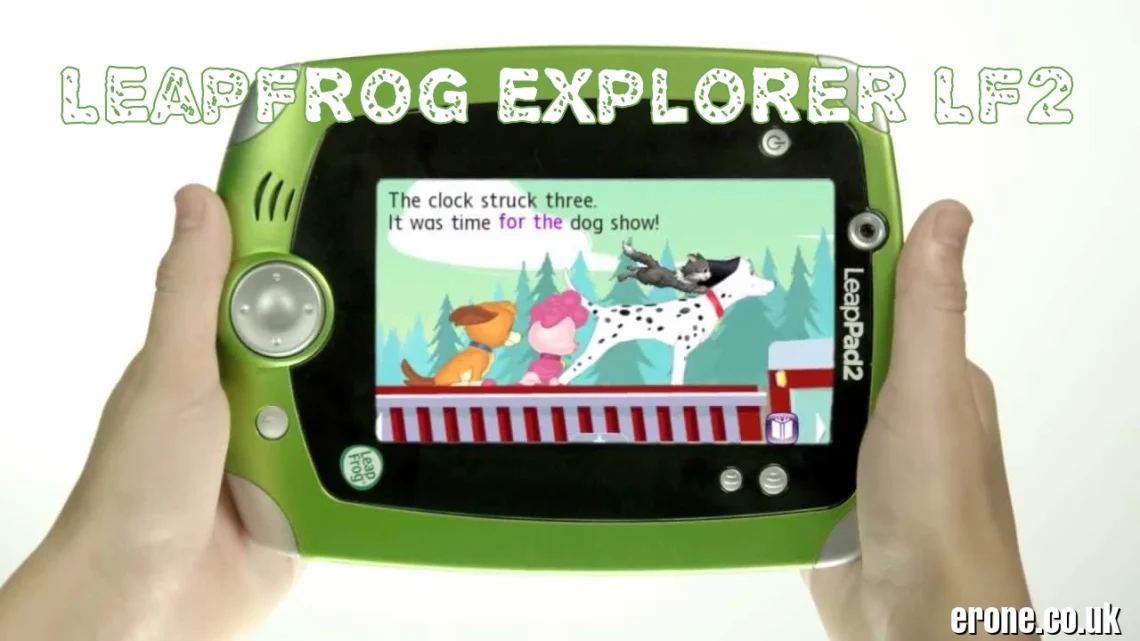
What Is the LeapFrog Explorer LF2? (Quick Overview)
LeapFrog Explorer LF2, here’s the simple answer:
It’s the LeapPad2 Explorer, a rugged educational tablet released in July 2012 as the upgraded version of the original 2011 LeapPad Explorer. Designed for kids ages 3–9 (best for 4–7), it delivers a 100% kid-safe, ad-free learning experience.
This is not an Android tablet. Not an iPad. Not internet-based.
It runs on LeapFrog’s closed educational system, meaning:
-
No Wi-Fi
-
No ads
-
No random YouTube videos
-
No stranger danger
Just structured, curriculum-based learning.
Is LF2 the Same as LeapPad2 Explorer?
Yes. “LF2” refers to the LeapFrog LF-2000 processor used in the LeapPad2. Sellers often label it as:
-
Explorer LF2
-
LeapPad2 LF2
-
LeapFrog LF2
All point to the same 2012 upgraded model.
Release History & Why It Was So Popular
-
Original LeapPad Explorer: August 2011
-
LeapPad2 Explorer (LF2): July 2012
-
Award: Toy of the Year 2012 (Overall + Educational + Preschool)
The LeapPad2 improved speed, camera quality, and storage. It quickly became one of the best-selling educational toys of the early 2010s.
Millions of kids worldwide used it between 2012–2015.
Who Is It Best For in 2026?
Even in 2026, it’s perfect for:
-
Preschoolers starting phonics
-
Early readers
-
Parents avoiding internet exposure
-
Travel entertainment
-
First learning tablet experience
For very young kids, simplicity beats modern complexity.
Full Technical Specifications (LeapPad2 Explorer LF2)
Let’s break down the hardware.
Display, Processor & Storage
-
Screen: 5-inch color resistive touchscreen
-
Resolution: 480 × 272
-
Processor: LeapFrog LF-2000 (ARM9 @ 550 MHz)
-
Storage: 4 GB internal
Resistive screens work with:
-
Finger
-
Stylus (included)
It’s not HD by 2026 standards, but it’s durable and responsive for kids.
Cameras, Controls & Connectivity
-
2.0 MP front + rear cameras
-
Built-in microphone
-
Physical D-pad buttons
-
Speaker
-
USB 2.0 connection (PC/Mac only)
No Wi-Fi. No Bluetooth. No internet browser.
This is intentional — it’s built for safety.
Battery Life, Build Quality & Durability
-
Power: 4 AA batteries
-
Playtime: 6–8 hours
-
Optional rechargeable docking kit (sold separately)
Build quality is where it shines.
-
Rubberized bumpers
-
Drop-resistant casing
-
Thick plastic shell
This device survives what iPads can’t.
Educational Features & Content Library
The real magic is in the learning content.
Learning Categories & Curriculum Focus
Over its lifecycle, the LeapPad2 supported 500–800+ apps and cartridges, covering:
-
Phonics
-
Reading
-
Math
-
Science
-
Social Studies
-
Creativity
-
Drawing & movie-making
Kids don’t realize they’re learning — they think they’re playing.
Popular Character Games & Backward Compatibility
Licensed content included:
-
Disney Princess
-
Mickey Mouse
-
PAW Patrol
-
Dora the Explorer
-
SpongeBob
-
Toy Story
It’s also backward compatible with original LeapPad Explorer cartridges.
That means a huge second-hand library still works.
Parent Controls & Kid-Safe System
Parents manage everything through LeapFrog Connect software:
-
Track progress
-
Download purchased content
-
Set time limits
-
Create up to 4 child profiles
No internet = no pop-ups, no ads, no in-app purchases.
Peace of mind matters.
Current Status in 2026 – Is It Still Supported?
Discontinued But Not Dead
LeapFrog discontinued the LeapPad2 years ago, replacing it with:
-
LeapPad3
-
LeapPad Ultra
-
LeapPad Academy
However, the LF2 still works perfectly offline.
LeapFrog Connect Software Support
As of February 25, 2026, LeapFrog Connect software remains downloadable from leapfrog.com.
Support resources like:
-
FAQs
-
Parent guides
-
Firmware updates
Are still available.
New app releases are limited, but previously purchased content still works.
Availability in USA, UK & Pakistan
In 2026, you’ll mostly find it:
-
On eBay
-
Amazon refurbished listings
-
Facebook Marketplace
-
OLX (Pakistan)
-
Daraz
Pakistan price range: PKR 4,000–12,000 depending on condition.
Imported models from USA/UK are common.
Market Value & Buying Guide (2026 Pricing)
Used Price Range & Bundles
Typical prices:
-
Tablet only: $25–50 USD
-
With games + case: $40–80 USD
-
Large bundles (5–10 cartridges): Higher value
Considering it’s over a decade old, resale value is surprisingly strong.
What to Check Before Buying
Inspect:
-
Battery compartment (common wear)
-
Screen scratches
-
USB cable included
Missing stylus isn’t a deal-breaker — replacements are cheap.
Rechargeable Kit Recommendation
If possible, buy the rechargeable battery pack.
AA batteries drain fast.
Long-term savings make the rechargeable kit worth it.
Pros, Cons & Modern Alternatives
Why Parents Still Love It
-
Extremely durable
-
Truly educational
-
Huge game library
-
Safe, closed system
-
Strong resale value
It’s a “learning-first” device, not entertainment-first.
Limitations in 2026
-
Low screen resolution
-
Slow compared to modern tablets
-
Camera quality is basic
-
Limited new app availability
Kids used to iPads may notice the difference.
But younger kids won’t care.
Best Alternatives If You Want Newer Tech
In 2026, consider:
-
LeapFrog LeapPad Academy (Wi-Fi, better screen)
-
LeapFrog Epic / Epic Academy
-
Amazon Fire Kids Tablet (with parental controls)
However, these introduce internet connectivity — which some parents prefer to avoid.
Conclusion
The LeapFrog Explorer LF2 (LeapPad2 Explorer) remains one of the most iconic educational tablets ever made.
Released in 2012, it delivered:
-
Safe learning
-
Durable design
-
Massive educational library
-
Zero internet risk
Even in 2026, it’s a fantastic low-cost option for younger children — especially parents who want a distraction-free learning device.
It may be old tech.
But for early childhood education, simple still works.
FAQs
1. Is LeapFrog Explorer LF2 the same as LeapPad2?
Yes. LF2 refers to the LeapPad2 Explorer model with the LF-2000 processor.
2. Does it have internet access?
No. It does not support Wi-Fi or browsing.
3. Is it still supported in 2026?
Yes. LeapFrog Connect software is still available for downloads and support.
4. What age is it best for?
Ages 4–7 benefit the most.
5. Is it worth buying used in 2026?
Yes — especially for parents wanting a safe, educational tablet without internet exposure.